
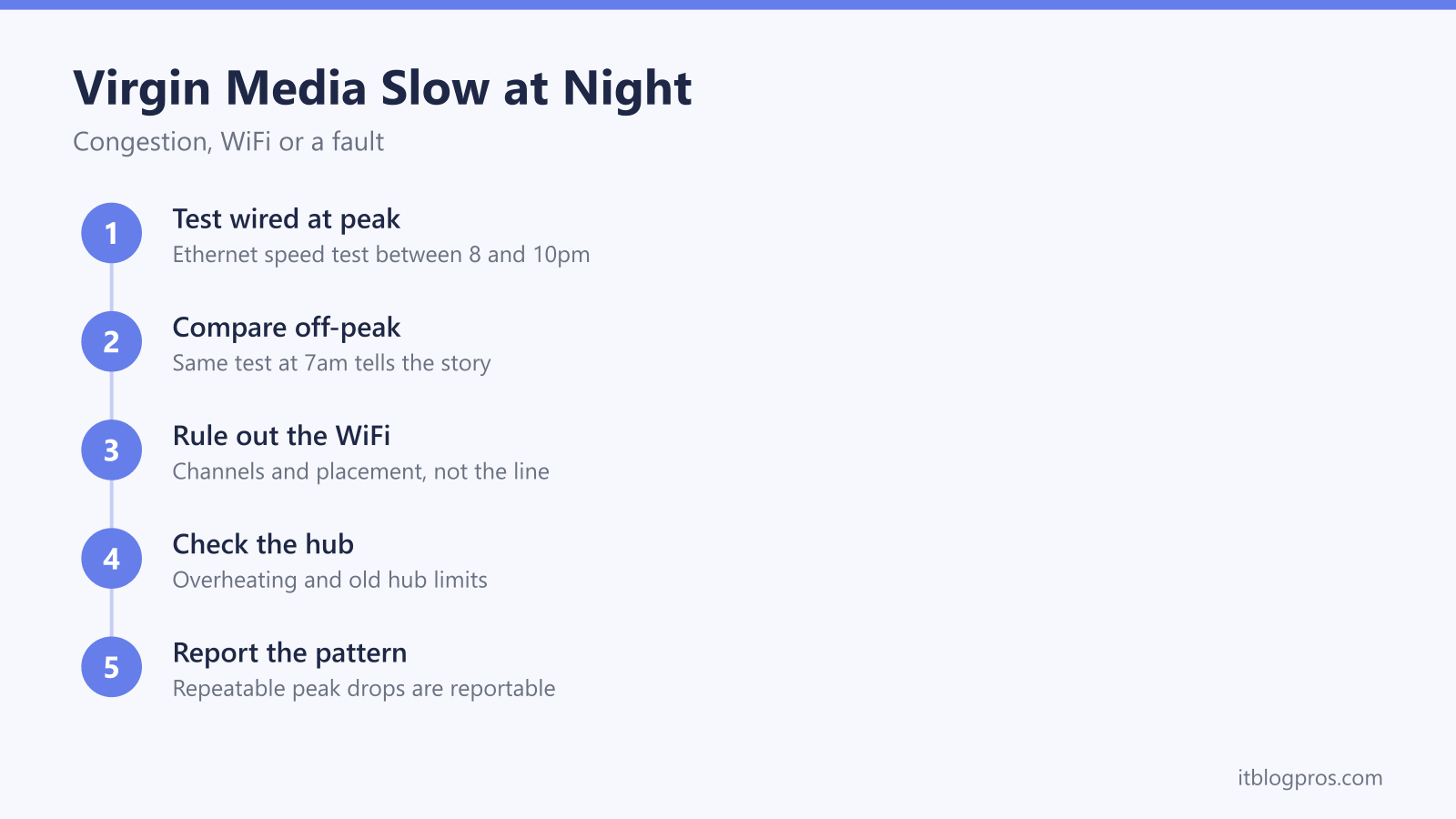
Speeds that look fine at breakfast and fall apart at nine in the evening are one of the most common complaints on a Virgin Media line. The pattern is real and it usually has a specific cause, but it is worth proving before spending money on kit that cannot touch it. Ten minutes of structured testing separates a congested cable segment from a WiFi problem sitting in your own living room.
Virgin Media slowing down at night is usually congestion on the shared cable segment your street sits on, not deliberate throttling. Prove it by running a wired speed test between 8pm and 10pm, then the same wired test early the next morning. A large peak-only gap on wired results points upstream to Virgin. Slow WiFi alongside healthy wired speeds points inside the house instead.
Key Takeaways
- Virgin Media's cable network shares local capacity between homes, so a nightly dip is normally congestion rather than anything aimed at your account.
- Virgin Media's published policy sets out no speed-based slowing of home broadband, which makes throttling the wrong suspect for an evening slowdown.
- One wired speed test at peak and the same test off-peak is the single measurement that separates congestion from a WiFi problem.
- Congested channels, hub placement and band choice make WiFi worse in the evening too, and none of that is fixable by phoning Virgin.
- A faster router does nothing for congestion, though modem mode hands the WiFi to your own router, and Virgin's help page says modem mode is not currently available for the Hub 5x.
Virgin Media shares local capacity, so evenings are the usual answer
Virgin Media runs a cable network, and cable is a shared medium by design. Homes served by the same local segment draw from a common pool of capacity, so how much is left for your connection depends on what the neighbours are doing at that moment. At eight in the morning that pool feels enormous. By nine at night, with a street full of households streaming, gaming and running video calls at once, the same pool is divided many more ways and everyone sags together.
That is congestion, and it is not throttling, even though the two feel identical from the sofa. Throttling means a network deliberately picking out an account or a type of traffic and slowing it on purpose. Virgin Media's published traffic management policy describes unlimited usage on its home broadband packages and states that it monitors total data volumes rather than specific applications or content; no speed-based slowing of home connections is set out in it. The peak-time rules that once slowed the heaviest downloaders were retired years ago, which is why forum threads still describing them are misleading. The policy, and a VPN test that settles the question on your own line, are covered in our look at whether Virgin Media really throttles your internet.
The honest cause hierarchy for a nightly slowdown runs in this order. Shared-segment congestion is the most likely explanation by a distance. WiFi trouble inside the house is a close second, and it happens to worsen in the evening as well, which muddies the picture badly. A genuine line or hub fault comes third, and it normally shows as under-speed at every hour rather than only after dark. Deliberate throttling does not make the list.
The wired test at peak and off-peak settles the question
There is only one measurement worth arguing from, and it needs a cable. Plug a laptop or desktop into one of the hub's LAN ports with an ethernet lead, close everything else that touches the connection, and run a speed test. That removes WiFi from the equation entirely, and the wired figure is the honest measure of what the line is delivering.
Now use the clock. Run that same wired test once inside the 8pm to 10pm window, which is the period Ofcom treats as residential peak, and once early in the morning before the day gets going. Keep everything else identical: same laptop, same cable, same test site. Write the numbers down rather than trusting memory, and repeat each one two or three times, because individual runs always bounce around a little.
The pattern is the diagnosis:
- Wired speed close to the package figure off-peak, well below it at peak. That is textbook congestion on the shared segment, and the fix sits with Virgin rather than with you.
- Wired speed far below the package figure at every hour. That is a fault rather than congestion, and it is worth logging with Virgin so the physical connection gets checked.
- Wired speed healthy at both hours while WiFi crawls. The broadband is fine and the problem is inside the house, which is a completely different set of fixes.
Do this before anything else. Most advice about evening slowdowns targets one of those three outcomes and is useless for the other two.
WiFi trouble peaks in the evening for its own reasons
The genuinely awkward part of this problem is that WiFi degrades at exactly the same hours congestion does, so the two get blamed for each other constantly. Neighbouring networks are busiest after work, and on the crowded 2.4GHz band that shows up as interference rising through the evening and easing overnight. Virgin's Intelligent WiFi page says the service keeps devices out of WiFi traffic jams by putting them on the quietest channel, so if one device still struggles every evening, test it on each band in turn. Only channels 1, 6 and 11 avoid overlapping each other on 2.4GHz, which is why so many networks pile onto the same few.
Placement matters more than most people expect. A hub inside a cupboard, behind a television or tucked into an alcove loses a large chunk of its usable range before a single device connects, and thick walls take more. Out in the open, upright, at roughly waist height and away from other electronics is the arrangement that gets the most out of it.
Band choice is the third piece. The 5GHz band is much faster but travels less far and copes poorly with walls; 2.4GHz reaches further, runs slower and takes the brunt of the evening interference. By default the hub merges both under one network name and decides for each device, which works until it does not. Giving the bands separate names lets you park phones, laptops and TVs deliberately on 5GHz and leave 2.4GHz for range and smart-home gear, and our guide to splitting the bands on a Virgin Media hub walks through the exact screens. Where the connection is not just slow but cutting out completely, the causes and the order to attack them are in Virgin Media WiFi keeps dropping.
The hub itself can be part of the problem
Heat is the one people miss. A unit shut in a cupboard, stood on carpet or catching afternoon sun has nowhere to shed it. Virgin's Hub lights help pages say a solid red light on the Hub 4 or Hub 5 might mean an issue with the cable connections or that the Hub is too hot, and a solid red power light on the Hub 3 usually means it is too hot. Their fix is to switch the hub off at the wall, place it upright in the open with its vents uncovered and away from heat sources, leave it 15 minutes to cool, then switch it back on and allow 5 to 10 minutes. That costs nothing, so it is worth doing before anything else.
Age is the other hub factor. The Hub 3 is the oldest unit still in plenty of homes, and its WiFi predates the current standards, so it runs out of puff sooner in a busy house full of devices. Its ethernet ports are gigabit, which is one reason Virgin supplies the faster tiers with a newer hub. The Hub 4 and Hub 5 handle more devices more gracefully, and the Hub 5 adds WiFi 6. Worth remembering, though: hubs are not something you buy. They come from Virgin, so a hub upgrade is a conversation with them, usually alongside a package change, rather than a purchase, and a cooler or newer hub still cannot change what the shared segment is doing outside your front door.
New kit will not fix congestion, and here is where it genuinely helps
Stating this plainly, because plenty of buying guides will not: no router, mesh system, USB adapter, powerline kit or WiFi 7 upgrade does anything about congestion on the shared cable segment. Every one of those sits behind the hub on your side of the connection, while congestion happens on the other side of it. If your wired result is 90 Mbps at 9pm and 500 Mbps at 7am, new hardware changes neither figure. The same goes for the usual list of tweaks: changing DNS servers, fiddling with QoS or running a VPN cannot manufacture capacity that is not there, and a VPN adds a small overhead rather than removing one. Anyone promising a peak-time speed increase from a box is selling something.
Where your own kit does earn its keep is the other branch of the diagnosis. When the wired numbers hold up at both hours and it is the WiFi that falls over, the hub's wireless is the bottleneck and that is entirely fixable at home. Virgin Media's reset and modem mode help page says modem mode turns the hub into a cable modem so you can connect your own WiFi kit, which hands the WiFi, the addressing and the settings to a router you choose. The same page says modem mode is not currently available for the Hub 5x, so on that hub a router or mesh in access-point mode behind the hub is the other route. Know the trade-offs before spending, because they are real. Virgin's Hub lights help pages say a Hub 4 or Hub 5 in modem mode won't be sharing WiFi, so the new router has to cover the whole house on its own. Virgin's modem mode page says it temporarily disables Cisco monitoring and the SamKnows speed test, Plume Pod compatibility, Intelligent WiFi and Connect app features, and that the hub's admin page moves to 192.168.100.1. Our Virgin Media Hub 5 modem mode walkthrough covers the steps and the gotchas.
For a flat or a small to mid-sized house, one capable router is enough. The TP-Link Archer BE550 is our pick on Virgin lines because TP-Link lists a dedicated 2.5 Gbps WAN port alongside tri-band WiFi 7, which matters on the gigabit tiers where a plain gigabit WAN port would become the limit. Larger or awkwardly shaped homes are better served by a mesh, since one box will never reach every room. Either way, the honest framing stands: this transforms what happens inside your house and does nothing whatsoever about peak-time congestion outside it.
Check the TP-Link Archer BE550 price on Amazon UK →
Reporting a repeatable pattern is what gets congestion fixed
Congestion is not a permanent sentence. It is a capacity problem on a specific piece of Virgin's network, and capacity problems get engineered away by splitting a segment or adding capacity to it. What the network team needs is evidence that the problem repeats, which is exactly what the testing above produces.
Check Virgin Media's service status page first, since a known area issue may already be logged. Then contact support with the actual data: the dates and times of each test, the wired figures at peak and off-peak, the package speed you pay for, and the fact that WiFi was ruled out with a cable. Ask specifically whether there is a known capacity issue on your local segment rather than framing it as a single-visit engineer job, because a technician checking the cabling inside your house cannot fix something happening in the street. A single complaint about one slow evening goes nowhere. A week of wired numbers showing the same collapse between 8pm and 10pm, and the same recovery by morning, is a pattern that can be logged and acted on.
The Ofcom speeds code gives you a floor and a way out
Broadband speeds in the UK sit under Ofcom's voluntary codes of practice, which Virgin Media has signed. Under the residential code, providers give a speed estimate that reflects peak-time performance before you buy, and your contract paperwork carries a minimum guaranteed download speed. That guaranteed figure is a floor, not the headline number, so an evening dip that still lands above it is not a breach however annoying it feels.
Where the code has teeth is sustained shortfall. Virgin Media's own speed policy sets out the guaranteed minimum for your package and the conditions under which a persistent drop below it, once reported and not resolved within the stated window, gives you the right to end the broadband service without an early disconnection fee. Ofcom's guide to the broadband speeds codes of practice explains the wider protection. Both are worth reading directly rather than relying on a figure quoted anywhere else, because the terms and the thresholds do change. Your wired test results are the evidence any such claim rests on, which is another reason to write the numbers down as you go.
The order to work through it
Keep the sequence simple and stop at whichever step gives you a straight answer.
- Run a wired speed test at 8pm to 10pm and again early the next morning, two or three runs each, numbers written down.
- A peak-only gap on wired results means congestion, so gather a week of it and report the pattern rather than buying anything.
- Consistently low wired results at every hour mean a fault, so log it with Virgin and let them check the line and the hub.
- Healthy wired results with poor WiFi mean the fix is inside the house: reposition the hub, give it air, split the bands and pick a clear channel.
- If the WiFi still cannot cover the house after all that, put your own router or mesh behind the hub: Virgin's help page gives modem mode steps for the Hub 3, 4 and 5 but says modem mode is not currently available for the Hub 5x, where access-point mode is the other route.
The unsatisfying truth is that the commonest cause of an evening slowdown is the one you cannot buy your way out of. The useful part is that ten minutes with a cable and a clock tells you which problem you actually have.