Spectrum ships most new internet orders as a self-install kit, which means the equipment arrives in a box a few days before the service start date and the connection is finished by the customer instead of a technician. The physical work is genuinely small: one coaxial cable, one power lead, and usually one ethernet cable. Almost all of the difficulty sits in two places, finding a wall outlet that is actually connected to the street, and getting the account activated once the modem is online.
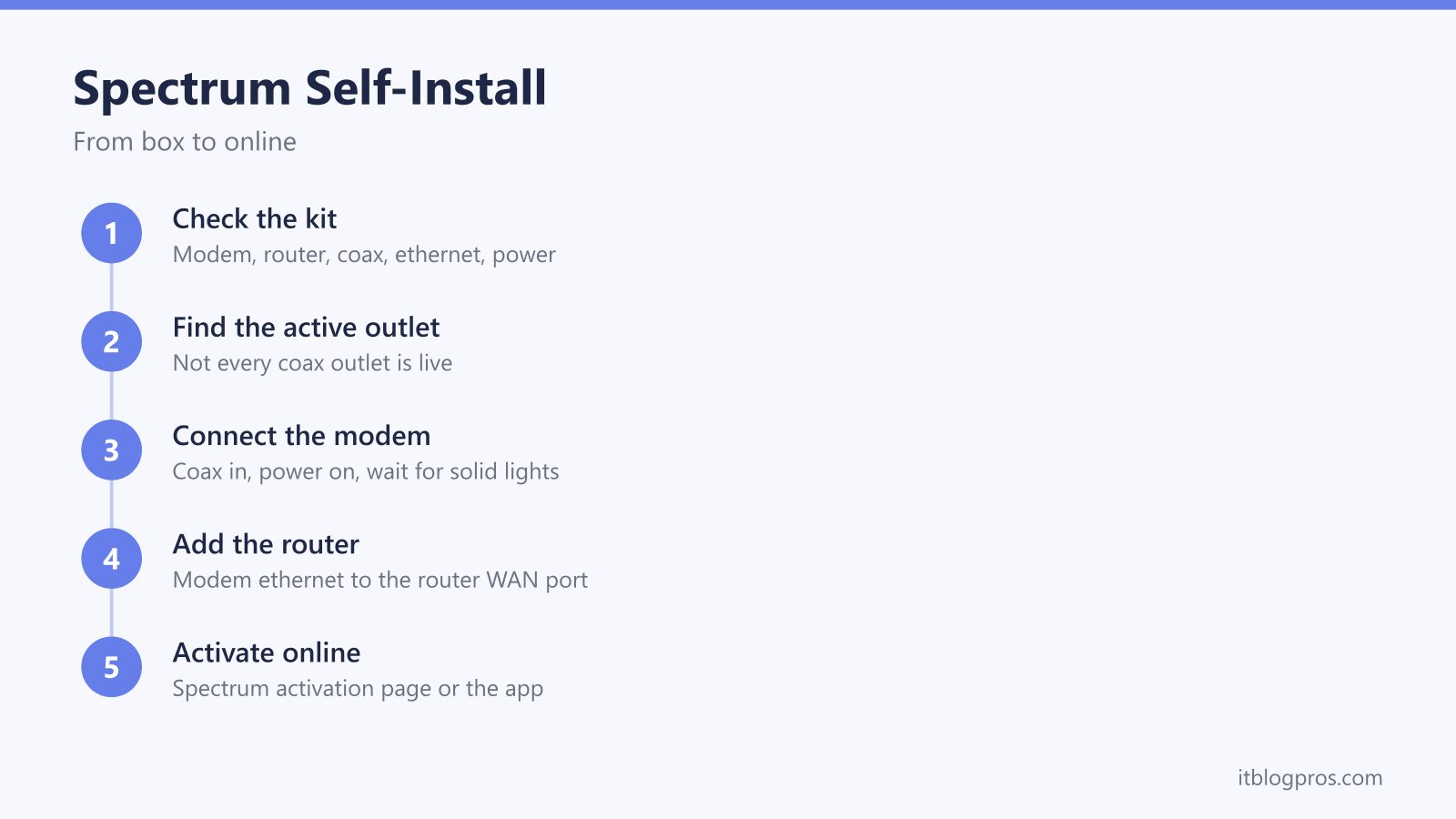
A Spectrum self-install is four steps: connect the coax cable from a live wall outlet to the modem, power the modem and wait for its online light to stop flashing, run an ethernet cable from the modem to the router WAN port, then activate the equipment on Spectrum's activation page or in the My Spectrum app. Most failed self-installs trace back to a dead coax outlet.
Key Takeaways
- The kit ships with the modem, a coaxial cable, an ethernet cable and power supplies, plus a router only when WiFi service was included on the order.
- Not every coax outlet in a home is connected back to the street, and a dead outlet is the single most common reason a self-install stalls.
- The modem needs several uninterrupted minutes to sync after coax and power are connected, so leaving it alone matters more than watching it.
- Activation runs through Spectrum's own activation page or the My Spectrum app, and it only succeeds once the modem is already online.
- A light that flashes and never settles, or an activation flow that keeps looping back to the start, is the point to contact Spectrum rather than re-cable the house.
What the Spectrum Self-Install Kit Contains
The box is built around whatever equipment the plan includes. On a standard internet order that means a cable modem, a coaxial cable to reach the wall outlet, an ethernet cable, and a power supply for each device. A Spectrum router is included only when WiFi service formed part of the order, along with its own power supply. Some orders ship a single combined unit that works as modem and router together, in which case there is no second box and no ethernet run between devices. Printed activation instructions usually come with the kit, and the equipment label on the underside or back of the router carries the default network name and password.
What the kit does not include is anything to do with the layout of the home. There is no coax splitter, no spare length of coaxial cable, no wall plate and no tools. If the live outlet turns out to be in the wrong room, or the cable supplied is too short to reach a sensible spot, that is a trip to a hardware store rather than something Spectrum ships.
One thing worth arranging before opening the box is a device to activate from. Activation happens over the internet, and the internet is what is being installed, so a phone on cellular data is the reliable option. A laptop connected to the modem by ethernet also works once the modem is online.
Not Every Coax Outlet in the House Is Live
This is the failure that wastes the most time on a self-install, and it has nothing to do with the equipment in the box. Only the outlets that run back to the street through the ground block outside carry a signal. Outlets left over from an older service, outlets hanging off a splitter that was capped, and outlets that were never terminated all look identical from the front.
A few things narrow it down quickly:
- Start where the previous service lived. An outlet with a cable already screwed into it, or a faint dust outline where a modem or cable box used to sit, is the strongest clue in the house.
- Follow the cable where the runs are visible. In a basement, crawl space, garage or utility closet, several coax cables often meet at a splitter. The single cable feeding that splitter is the one coming in from outside.
- Test outlets one at a time, giving the modem a few minutes on each. Rushing produces false negatives, because the modem needs that time everywhere.
- Remove splitters from the path where possible. Splitters weaken the signal, and a corroded or badly rated one can push it below what the modem needs.
- Hand tighten every connector squarely. Loose and cross-threaded coax connectors are a common and completely invisible cause of a modem that almost works.
When no outlet in the house produces a steady online light, the install is over and a technician visit is the answer. Spectrum may need to reconnect or replace the ground block, activate the line at the tap, or run a new drop to the property. None of that can be done from inside, and no amount of restarting equipment substitutes for it.
Connecting the Modem and Letting It Sync
Screw the coaxial cable from the chosen outlet into the modem's cable port, plug the power supply in, and then leave the modem alone. That last part is the step people get wrong.
On a first connection the modem has to lock on to downstream and upstream channels, pull a configuration file from Spectrum, and frequently apply a firmware update before it is ready to be activated. That sequence takes several minutes and can run longer on a brand new unit. Unplugging it partway through, or moving the coax to test another outlet mid-sync, sends the whole process back to the beginning.
Front panels differ between models, so behavior is a more reliable guide than color. Lights that flash, cycle or move through a sequence mean work is still happening, while the panel settling down, with the online or internet indicator holding steady rather than blinking, means the modem has finished. Spectrum publishes panel details for the models it issues on its own equipment support pages, and checking the model number there beats trusting a generic light chart, since a chart written for one gateway can be actively wrong for another. Allow 10 to 15 minutes of undisturbed time before deciding an outlet is dead.
Adding the Router to the Modem
If the kit contained a separate router, the connection is one cable. Run the ethernet cable from the ethernet port on the modem to the WAN or internet port on the router, which is normally set apart from the numbered LAN ports and often a different color. Then power the router and give it a few minutes to come up. Plugging the modem into a numbered LAN port instead is a frequent slip, and it produces a WiFi network that connects fine but carries no internet.
If the kit contained a combined modem and router gateway, this step does not exist. Coax and power is the entire physical install, and the WiFi comes from the same box.
Once the router is up, connect one device using the default network name and password printed on the equipment label. That confirms the router half is working, even though the internet is not live until activation.
Activating the Service Online or in the App
Activation tells Spectrum's systems that this equipment belongs to this account. Until it happens, a perfectly connected modem still will not pass traffic.
There are two routes and both come from Spectrum directly. The Spectrum self-install and activation page walks through the prompts in a browser, and the My Spectrum app does the same on a phone. Have the account number on hand, which appears on the shipping letter, a store receipt or account emails. Spectrum changes the wording and layout of these screens over time, so the prompts on screen are the authority rather than menu labels copied from an article.
If TV equipment came with the order, connect the receivers before starting, since the flow activates everything on the account in one pass.
What to Do When Activation Fails
Activation failures usually come down to one of four things.
The account is not provisioned yet. Kits often arrive several days early. Attempting activation before the service start date shown on the order confirmation will not work, and no amount of retrying changes that.
The modem has not finished syncing. If the panel is still cycling, activation has nothing to talk to. Waiting is the fix.
The equipment is not matched to the account. Spectrum ties equipment to an account using identifiers printed on the device label. A unit that came from a different kit, was bought secondhand, or was swapped between households can fail activation until support registers it against the account.
The page keeps looping. An activation flow that returns to its first screen repeatedly sometimes clears by switching from the browser to the My Spectrum app, or from one device to another.
After two clean attempts, phoning is faster than a third try. Use the number printed on the bill or the contact option inside the app, and treat any support number found in a search advertisement or pop-up as untrustworthy, because fake ISP support lines are a common scam.
The Self-Install Failures Worth Recognizing Early
- No lights at all. This is a power problem, not a signal problem. Try another outlet and make sure the power connector is fully seated. A unit that stays dark is faulty and needs replacing through a Spectrum store or by mail.
- Lights that flash and never settle. This is signal. Work through outlets, remove splitters, and tighten connectors, then stop and book a visit.
- Online at the modem, nothing on devices. This is the router half. Power cycle in order, modem first until it holds steady, then the router. The guide to resetting a router on every US ISP explains why a power cycle and a factory reset are not the same thing, which matters because a factory reset erases the network name and password.
- A red light on a Spectrum router. The Spectrum router red light fix covers what solid red and blinking red each mean and the order to work through them.
- Everything connected, activation still refused. This is an account issue, and it is resolved on the phone rather than at the wall.
A self-install is realistically a 20 to 40 minute job. Once an hour has gone by with no outlet producing a steady online light, or the modem has never held one anywhere in the house, the problem sits on the line or on the account and booking the technician saves the evening. Technician visit charges vary by market and by the offer the account was signed up on, so confirm the cost with Spectrum before the appointment is set.
Using Your Own Modem or Router Instead of the Kit
Spectrum's equipment arrangement differs from most cable providers, which changes the usual advice about buying hardware. Standard Spectrum internet plans include the modem without a monthly rental charge, so there is no modem rental line on the bill to eliminate. The recurring equipment charge that does appear on many accounts is for WiFi service, and that is the part a customer-owned router or mesh system can replace.
For a self-install specifically, a customer-owned modem adds a step rather than removing one. It has to be a Spectrum-approved DOCSIS 3.1 model and still has to be registered to the account during activation, which is exactly where third-party modems tend to stall. A customer-owned router is simpler, since it connects to the supplied modem the same way the Spectrum router would. The Spectrum modem and router guide works through which piece of equipment actually removes a charge and which one does not, along with the approval list and the bridge mode setting that matters when the supplied unit is a combined gateway.
After the Install
Once the connection is live, change the network name and password from the label defaults and move the router somewhere open and off the floor rather than leaving it behind a TV or shut in a closet.
Then check the first bill. Spectrum applies a one-time charge on some orders for activation or self-install, and whether it applies at all depends on the market and the offer, so the order confirmation email is the reference rather than a figure quoted in an article. The guide to paying a Spectrum bill without signing in covers the guest payment route and which recurring equipment charges are worth questioning once the account settles down.